How to run a buffer:
If you need to obtain a list of parcels that are within a certain distance from a certain property you are able to do this by using the Kane County Public GIS Portal. The Kane County Public GIS Portal can be accessed at
https://gistech.countyofkane.org/gisims/kanemap/kanegis4_agox.html.
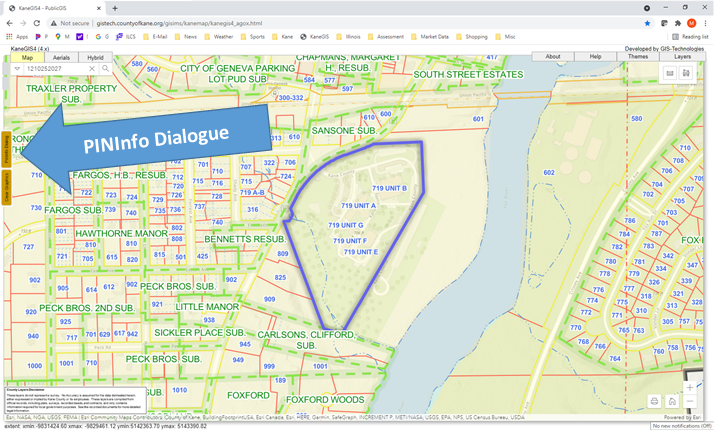
Step 1: Enter the location of the parcel you are seeking by address or parcel number using the search box located in the upper left corner of the screen.
Step 2: After you have found the parcel, click on the PINInfo Dialogue box. The PINInfo Dialogue box is a gold colored button is located along the far left of the screen.
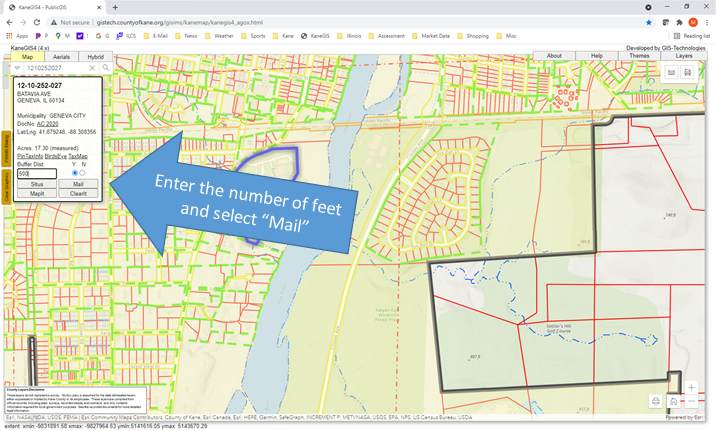
Step 3: Enter the number of feet you are seeking inside the box labeled Buffer Dist. Select the “Mail" button to obtain a list of the mailing addresses of each of the parcels, this will display all the of parcels and their addresses that are within the distance you entered.
If you need owner names, you can always find them by entering the respective parcel numbers at the property lookup portal at
https://kaneil.devnetwedge.com/.
